OpenClaw uses 7 markdown files in your ~/.openclaw/workspace/ directory to configure your AI agent. The core three are SOUL.md (personality and values), AGENTS.md (operating rules and security), and USER.md (your personal context). These files are injected into every session's system prompt automatically, giving your agent persistent identity and knowledge.
The Complete Guide to OpenClaw Configuration Files (.md Files)
OpenClaw uses 7 markdown (.md) configuration files to control how your AI agent behaves — from its personality and tone to its memory, automated tasks, and security boundaries. These files are plain text, so you don't need any coding knowledge to edit them. The main ones are persona.md (defines who your agent is), memory.md (stores context between conversations), tasks.md (schedules recurring automations), and skills.md (manages which of the 10,700+ ClawHub skills are active). You edit them in any text editor, and changes take effect immediately — no restart needed. The catch: there's no visual editor yet. You're working directly with markdown syntax, which takes some getting used to if you've never seen it. Most people get comfortable with the format in about 15 minutes. Start with persona.md since it has the biggest impact on how your agent communicates.
Trusted by 194+ business owners who configured OpenClaw in our live workshop — endorsed by Josh Nelson's 7 Figure Agency community (20,000+ agency owners)
The 7 files that control your OpenClaw agent are markdown files in a single directory. Each file serves a distinct purpose — from defining personality to scheduling automated tasks. Here is every file, what it does, and where to learn more.
| File | Purpose | Priority | Guide |
|---|---|---|---|
SOUL.md | Personality, voice, values, ethical constraints | Must-have | Full Guide |
AGENTS.md | Operating rules, security boundaries, session behavior | Must-have | Full Guide |
USER.md | Your personal context, role, business details | Must-have | Full Guide |
IDENTITY.md | Agent name, emoji, creature type, avatar | Recommended | Full Guide |
TOOLS.md | Environment info, SSH hosts, installed tools | Optional | Full Guide |
MEMORY.md | Long-term memories, learned context, preferences | Recommended | Full Guide |
HEARTBEAT.md | Scheduled tasks, periodic check-ins, recurring actions | Optional | Full Guide |
Quick Start — Your First 3 Files
You only need three files to get a fully configured OpenClaw agent. Start with these, then add optional files as your needs grow. The entire process takes under 10 minutes.
1Create SOUL.md — Your Agent's Personality
SOUL.md defines who your agent is — its values, communication style, and behavioral constraints. This is the most important configuration file because it shapes every response your agent generates. Write it in plain English, describing the personality you want.
# SOUL

## Core Truths
- I am a helpful AI assistant focused on productivity and clarity
- I value accuracy over speed — I verify before I answer
- I respect user privacy and never share personal information

## Boundaries
- I never fabricate data, statistics, or citations
- I clearly state when I'm uncertain about something
- I ask for clarification rather than making assumptions

## Vibe
- Professional but approachable
- Concise — I get to the point quickly
- I use examples to illustrate complex concepts

## Continuity
- If you change this file, tell the user — it's your soul, and they should know
- This file is yours to evolve as you learn the user's preferences2Create AGENTS.md — Operating Rules and Security
AGENTS.md sets the guardrails for what your agent can and cannot do. It defines security rules, session startup behavior, and operating procedures. AGENTS.md takes priority over SOUL.md for security matters — if there is a conflict, AGENTS.md wins. This ensures your safety boundaries are always enforced.
# AGENTS

## Security Rules
- Never execute destructive commands without explicit user confirmation
- Never access files outside the workspace directory without permission
- Always confirm before sending emails, messages, or making API calls

## Session Startup
- Greet the user by name (from USER.md)
- Check HEARTBEAT.md for any due tasks
- Summarize any pending items from last session

## Operating Rules
- Prefer reading existing files before creating new ones
- Always explain what you're about to do before doing it
- Keep responses focused — one topic at a time
- If a task requires multiple steps, present a plan first

## Memory Protocol
- Save important decisions and preferences to MEMORY.md
- Review memory before answering questions about past work
- Never store passwords, API keys, or sensitive credentials3Create USER.md — Your Personal Context
USER.md tells the agent about you — your name, role, business, tools you use, and how you prefer to communicate. This context allows the agent to personalize every interaction without you repeating yourself each session. Think of it as a permanent briefing document about you.
# USER

## Identity
- Name: [Your Name]
- Role: [Your Title / Role]
- Company: [Your Company]
- Industry: [Your Industry]

## Work Context
- Primary tools: [e.g., Slack, Gmail, Notion, GitHub]
- Working hours: [e.g., 9am-5pm EST]
- Communication style: [e.g., Direct, prefers bullet points]

## Preferences
- I prefer concise answers over detailed explanations
- Always use metric units unless I specify otherwise
- When writing emails, match my tone — professional but friendly

## Current Focus
- [What you're working on right now]
- [Key priorities this week]How OpenClaw Assembles Your System Prompt
Every time you start a new session, OpenClaw reads all .md files from your workspace directory and combines them into a single system prompt. Understanding this process helps you write better configuration files and debug unexpected behavior.
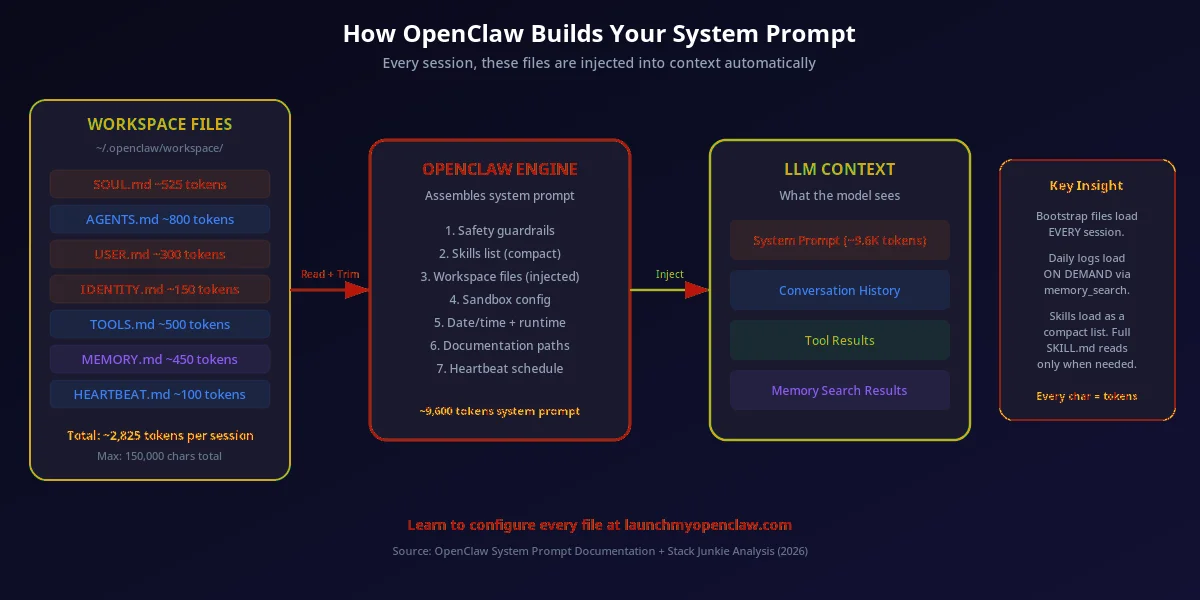
1. File Discovery
OpenClaw scans ~/.openclaw/workspace/ for all .md files. It reads SOUL.md first, then AGENTS.md, USER.md, and the remaining files in alphabetical order. Each file is loaded into memory as raw markdown text.
2. Prompt Assembly
The engine concatenates all loaded files into a single system prompt, with clear separators between sections. The total size is capped by the bootstrapMaxChars setting (default: 150,000 characters). Files that exceed this limit get truncated.
3. LLM Injection
The assembled system prompt is sent to your configured LLM provider (OpenAI, Anthropic, local Ollama, etc.) as the first message in the conversation. The LLM treats it as foundational context that shapes every response it generates.
Token Budget Warning
The baseline system prompt uses approximately 2,825 tokens before your .md files are added. Every character in your configuration files costs tokens from the LLM's context window. For a model with a 128K context window, that leaves roughly 125K tokens for your files plus the actual conversation. Keep your .md files concise — a 50-line SOUL.md is better than a 200-line one. Long files get truncated silently, which can cause unpredictable behavior.
The OpenClaw Workspace Directory
All configuration files live in a single directory on your local machine. Here is the complete directory structure showing every file OpenClaw reads at startup.
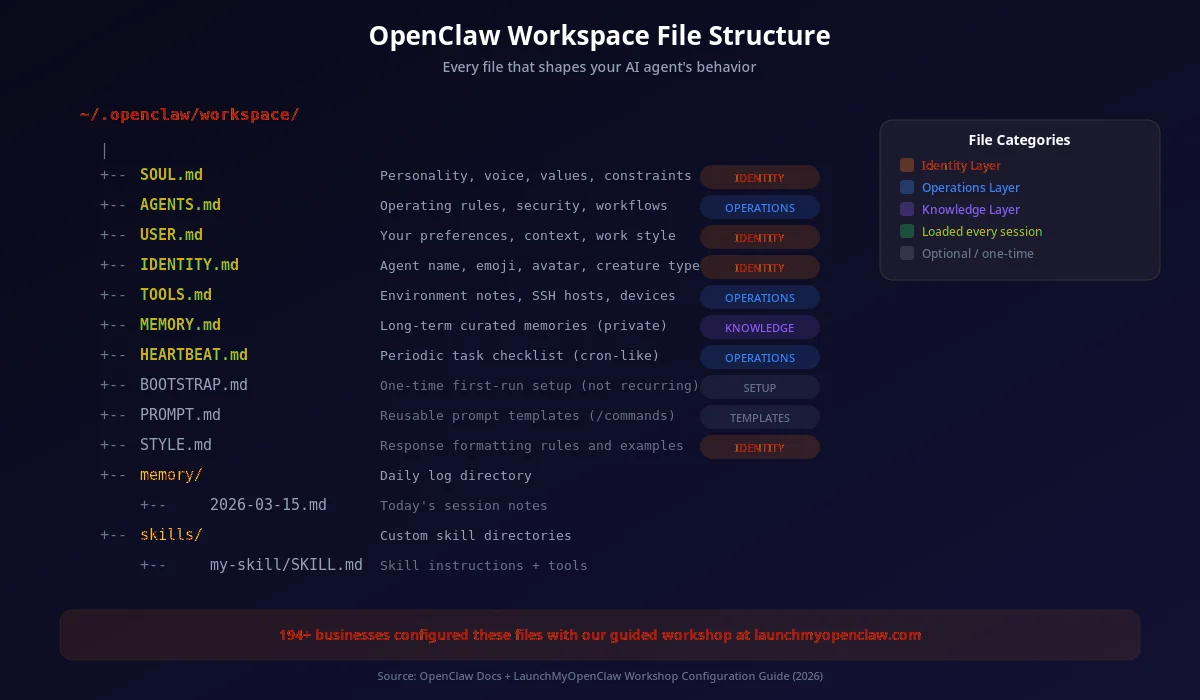
~/.openclaw/
├── workspace/
│   ├── SOUL.md          # Personality, values, constraints
│   ├── AGENTS.md        # Operating rules, security
│   ├── USER.md          # Your personal context
│   ├── IDENTITY.md      # Name, emoji, avatar
│   ├── TOOLS.md         # Environment info
│   ├── MEMORY.md        # Long-term memories
│   ├── HEARTBEAT.md     # Scheduled tasks
│   ├── STYLE.md         # Output formatting (optional)
│   ├── BOOTSTRAP.md     # First-run setup (optional)
│   └── skills/          # Custom skill definitions
│       ├── research.md
│       ├── daily-report.md
│       └── crm-update.md
├── config.json          # Runtime settings
└── logs/                # Session logs
3 Real-World Configuration Examples
Complete, copy-paste-ready configurations for the three most common OpenClaw setups. Each example includes the full content of every .md file you need. These are the exact templates 194+ workshop attendees use to configure their agents.
Personal Assistant Configuration
A casual, proactive agent that manages your schedule, summarizes emails, tracks habits, and provides morning briefings. Uses SOUL.md for friendly personality, USER.md for personal details, and HEARTBEAT.md for daily automated check-ins. This is the most popular configuration among our workshop attendees.
# SOUL.md — Personal Assistant

## Core Truths
- I am Spark, a proactive personal assistant
- I help you stay organized, on schedule, and focused
- I remember your preferences and adapt over time

## Vibe
- Casual and friendly — like talking to a helpful roommate
- I use light humor when appropriate
- I'm proactive — I suggest things before you ask

## Boundaries
- I never share your personal info
- I ask before adding anything to your calendar
- I confirm before sending messages on your behalf

---

# USER.md — Personal Assistant

## Identity
- Name: Alex Chen
- Location: Austin, TX
- Timezone: CST (UTC-6)

## Daily Routine
- Morning: Coffee, email check, gym at 7am
- Work: 9am-5pm (software engineering)
- Evening: Reading, cooking, side projects

## Preferences
- Remind me about gym if I haven't gone by 8am
- Summarize emails by priority, not chronology
- I prefer Markdown for notes

---

# HEARTBEAT.md — Personal Assistant

## Every Morning (8:00 AM)
- Check weather forecast for Austin
- Summarize top 5 emails by priority
- List today's calendar events
- Check if any bills are due this week

## Every Friday (5:00 PM)
- Summarize the week's accomplishments
- List anything I said I'd do but didn't
- Suggest weekend plans based on weather
Developer Copilot Configuration
A precise, technical assistant focused on code quality, security review, and development workflow. Uses SOUL.md for technical precision, AGENTS.md for code review rules, and TOOLS.md for your development environment. Ideal for full-stack developers who want a coding partner that knows their stack.
# SOUL.md — Developer Copilot

## Core Truths
- I am a precise, technical coding assistant
- I prioritize correctness, security, and performance
- I write clean, well-documented code

## Vibe
- Technical and direct — no filler words
- I explain my reasoning in code comments
- I reference documentation and best practices

## Boundaries
- I never commit code without review
- I flag security vulnerabilities immediately
- I refuse to write intentionally obfuscated code

---

# AGENTS.md — Developer Copilot

## Code Review Rules
- Check for OWASP Top 10 vulnerabilities
- Verify error handling on all async operations
- Ensure tests cover edge cases, not just happy paths
- Flag any hardcoded credentials or API keys

## Session Startup
- Check git status and current branch
- List any failing CI/CD pipelines
- Summarize open pull requests needing review

## Operating Rules
- Read existing code before suggesting changes
- Prefer editing over creating new files
- Follow the project's existing code style

---

# TOOLS.md — Developer Copilot

## Environment
- OS: macOS Sonoma
- Shell: zsh with oh-my-zsh
- Editor: VS Code with Copilot
- Node: v20.11 via nvm
- Python: 3.12 via pyenv

## Repositories
- ~/projects/main-app — React + TypeScript frontend
- ~/projects/api-service — Python FastAPI backend
- ~/projects/infra — Terraform + AWS CDK

## SSH Hosts
- staging: deploy@staging.example.com
- production: deploy@prod.example.com (REQUIRE CONFIRMATION)
Business Automation Agent Configuration
A professional agent that handles CRM workflows, client communication, lead qualification, and business metrics tracking. Uses all four core files: SOUL.md for brand-aligned personality, AGENTS.md for CRM workflow rules, USER.md for business context, and MEMORY.md for client history. This is the configuration most agencies deploy.
# SOUL.md — Business Automation Agent

## Core Truths
- I am a professional business automation assistant
- I help manage CRM, email outreach, and client communication
- I maintain brand voice consistency across all channels

## Vibe
- Professional and polished
- Data-driven — I reference metrics and KPIs
- I present options, not just answers

## Boundaries
- Never send client-facing communication without approval
- Always log important decisions in MEMORY.md
- Escalate to the human for deals over $10,000

---

# AGENTS.md — Business Automation Agent

## CRM Workflows
- New lead received → qualify based on scoring criteria
- Qualified lead → draft personalized outreach email
- No response after 3 days → suggest follow-up strategy
- Meeting booked → prepare briefing document

## Security
- Never share client data between accounts
- All outreach must comply with CAN-SPAM
- Log every client interaction in CRM

---

# USER.md — Business Automation Agent

## Business Context
- Company: Apex Digital Agency
- Industry: Digital Marketing
- Team size: 12 people
- Primary CRM: GoHighLevel
- Email platform: Gmail + Instantly

## Brand Voice
- Professional, confident, results-focused
- We use data and case studies, not hype
- Our target client: local service businesses ($500K-$5M revenue)

---

# MEMORY.md — Business Automation Agent

## Client History
- Acme Plumbing: Signed Jan 2026, SEO + PPC package, $2,500/mo
- Metro Dental: Prospect, had discovery call Feb 12, follow up March 1
- Sunrise Realty: Long-term client since 2024, expanding to social media

## Key Decisions
- Switched from Mailchimp to Instantly for cold outreach (Feb 2026)
- New qualification criteria: minimum $1M revenue for full-service clients
Advanced Configuration Files
Beyond the core 7 files, OpenClaw supports additional configuration files for power users who want fine-grained control over formatting, initialization, and custom capabilities.
STYLE.md
Controls how your agent formats responses — markdown preferences, code block style, emoji usage, verbosity level, and response length. Separate from SOUL.md (personality) and focuses purely on output formatting.
Read the STYLE.md guideBOOTSTRAP.md
Defines one-time initialization tasks that run when the agent first starts with a fresh workspace. Used for importing contacts, setting up directories, or running initial data pulls. Only executes once, then marks itself as completed.
Read the BOOTSTRAP.md guidePROMPT.md
Stores reusable prompt templates that your agent can reference. Instead of typing the same complex prompt repeatedly, save it in PROMPT.md and call it by name. Great for standardized reports, email drafts, and analysis workflows.
Read the prompts guideskills/ directory
The skills/ subdirectory contains individual skill definition files. Each skill is a markdown file with YAML frontmatter that defines a reusable capability — from web research to CRM updates to report generation. Install community skills from ClawHub.
Read the skills guide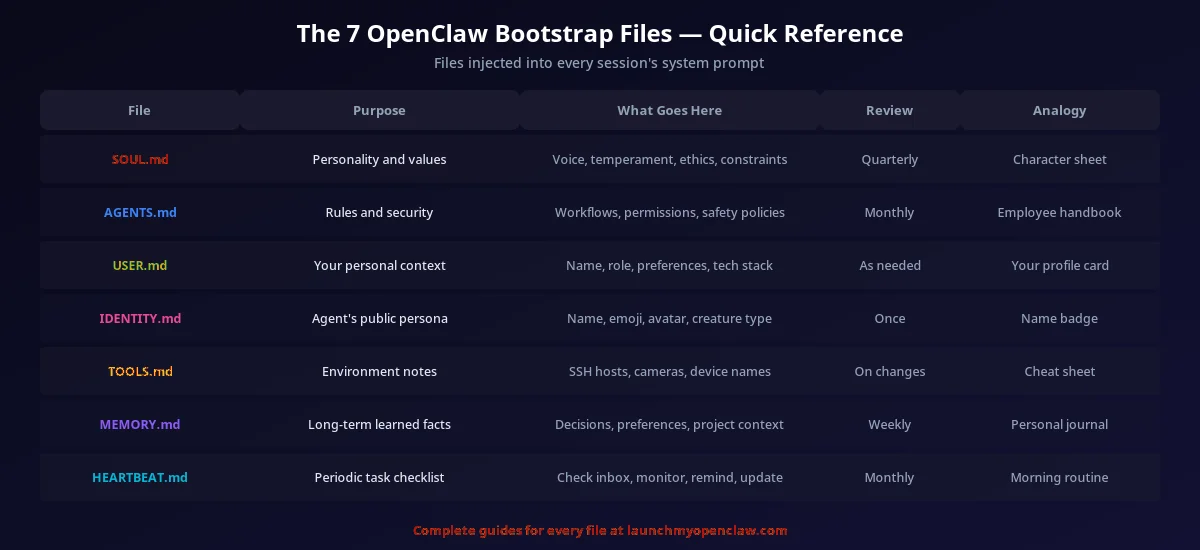
Configure All 7 Files in 20 Minutes
Our workshop walks you through every .md file with prompt examples and templates for your specific business. 194+ business owners have configured their agents using our step-by-step process.
Get the Automation Playbook (Free)
One deploy-ready automation every week. Same strategies our clients pay thousands for. 400+ business owners already inside.
Need it done for you?
Book a Free Strategy Call See what we've built for real businesses →Frequently Asked Questions About OpenClaw .md Files
All OpenClaw Configuration Guides
SOUL.md Guide
Define your agent's personality, values, and behavioral constraints
AGENTS.md Guide
Set operating rules, security boundaries, and session behavior
USER.md Guide
Provide your personal context, role, and communication preferences
IDENTITY.md Guide
Name your agent, set its emoji and creature type
STYLE.md Guide
Control response formatting, verbosity, and markdown preferences
TOOLS.md Guide
Document your environment, SSH hosts, and available tools
MEMORY.md Guide
Configure long-term memory, recall, and learned preferences
HEARTBEAT.md Guide
Schedule recurring tasks, check-ins, and automated workflows
BOOTSTRAP.md Guide
Set up first-run initialization and one-time setup tasks
Skills Guide
Create custom skills and install community skills from ClawHub
Identity Architecture
Deep dive into how OpenClaw's multi-layer identity system works
Setup Guide
Complete installation and setup guide for all platforms