

What Is OpenClaw? Free AI Agent, Local Automation, Messaging Control
OpenClaw is a free, open-source AI agent with over 200,000 GitHub stars and an MIT license. Created by Peter Steinberger, it runs on your own computer or server and connects to you through WhatsApp, Telegram, Slack, Discord, Signal, and iMessage. You tell it what to do in plain English, and it handles the rest — responding to messages, scheduling appointments, qualifying leads, managing emails. It's model-agnostic, meaning you pick whichever AI brain you want: Claude, GPT-4o, Gemini, DeepSeek, Kimi K2.5, or fully local models through Ollama if privacy is non-negotiable. The community has built 10,700+ skills on ClawHub that you can install in seconds. Unlike Zapier or Make, OpenClaw doesn't just connect triggers to actions — it understands context, makes decisions, and executes multi-step workflows autonomously. Your data stays on your machine. The trade-off is that setup takes about 20 minutes and you'll need an LLM API key ($10-50/month depending on usage). But once it's running, you've got a 24/7 assistant that actually gets smarter over time.
Over 194 businesses use OpenClaw for daily automation — from email triage to lead qualification to appointment booking. In this guide, we cover OpenClaw's origin story, architecture, how it compares to other AI tools, five real use cases, and how to get started.
200,000+
GitHub Stars
35,000+
Forks
194+
Businesses Using It
10,700+
ClawHub Skills
To put those numbers in context: OpenClaw is one of the fastest-growing open-source AI projects of 2026. For comparison, LangChain has ~100K stars, AutoGPT has ~170K, and Next.js has ~130K. OpenClaw's growth reflects demand for AI agents that actually do things — not just chat.
The Origin Story: From Moltbot to OpenClaw
OpenClaw started in January 2026 as Moltbot — a side project by Peter Steinberger, a well-known iOS developer and founder of PSPDFKit. Steinberger wanted a personal AI assistant that could do more than answer questions — he wanted it to take action. Book meetings. Reply to messages. Update his CRM. All through the messaging apps he already used.
The first version was Claude-specific, which led to the name Clawdbot. But as the project grew, the community demanded support for other models — GPT-4o, Gemini, DeepSeek, and local models via Ollama. Steinberger rebuilt the architecture to be fully model-agnostic, and the project was renamed OpenClaw to reflect its open, model-independent nature.
What happened next was explosive growth. OpenClaw hit 100,000 GitHub stars within its first month, making it one of the fastest open-source repos to reach that milestone. The Maton Gateway — which handles message routing between platforms — became a standalone component used by other projects too. By March 2026, the ClawHub skill marketplace had 10,700+ community-contributed skills.
How Does OpenClaw's Architecture Work?
Understanding the architecture helps you see why OpenClaw is fundamentally different from cloud automation tools. Here's how messages flow from your phone to executed tasks.
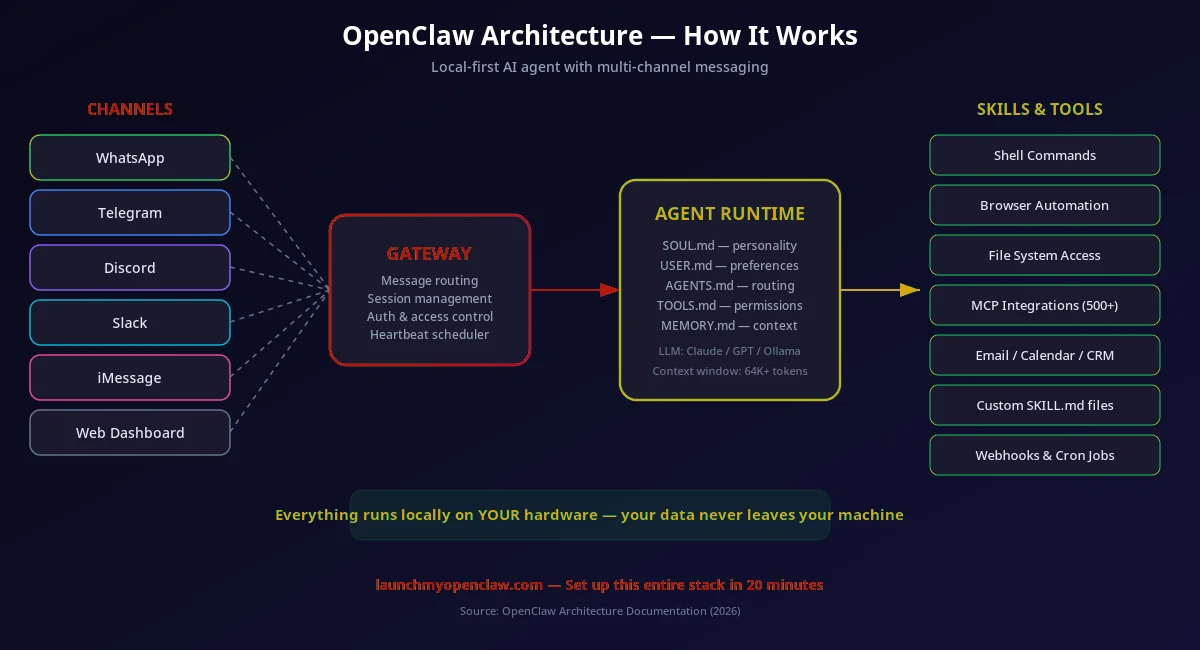
1. Messaging Layer (Maton Gateway): The Maton Gateway sits between your messaging platforms and the OpenClaw agent. It handles WhatsApp pairing, Telegram bot tokens, Slack OAuth, and other platform-specific authentication. Messages come in through the gateway and get normalized into a standard format the agent understands.
2. Agent Core (Hierarchical Planner): When a message arrives, the agent's planning framework breaks your request into subtasks. "Book a meeting with John next Tuesday at 2pm" becomes: (a) look up John's contact, (b) check calendar for Tuesday 2pm, (c) create event, (d) send invite, (e) confirm via reply message. Each subtask is executed by the appropriate AgentSkill.
3. AgentSkills & ClawHub: Skills are modular capabilities — email, calendar, CRM, browser, shell, file management, etc. OpenClaw ships with 100+ built-in skills and can install any of the 10,700+ community skills from ClawHub. Skills run locally on your machine with the permissions you grant.
4. LLM Gateway: The AI model is separate from the agent. OpenClaw's internal gateway routes requests to whichever LLM you configured — Claude, GPT-4o, Gemini, or a local Ollama model. It handles auth rotation, rate limiting, and fallback chains (e.g., try Claude first, fall back to GPT if Claude is down).
// Simplified openclaw.json architecture config
{
  "gateway": {
    "providers": ["whatsapp", "telegram", "slack"],
    "maton": { "port": 3000, "auth": "token" }
  },
  "llm": {
    "primary": "claude-4-sonnet",
    "fallback": "gpt-4o",
    "local": "ollama/llama3"
  },
  "skills": {
    "builtin": ["email", "calendar", "crm", "browser"],
    "clawhub": ["lead-scorer", "invoice-generator"]
  },
  "memory": { "enabled": true, "provider": "local" }
}
Why Businesses Choose OpenClaw
Autonomous AI Agent
A persistent, always-on agent that takes action on your behalf — not just a chatbot. Uses a hierarchical planning framework.
Privacy-First, Local Execution
Runs on your own hardware. Your data, credentials, and configuration files (SOUL.md, MEMORY.md) never leave your machine.
Model-Agnostic
Works with Claude, GPT-4o, Gemini, DeepSeek, Kimi K2.5, or free local models via Ollama. Configure in openclaw.json.
Messaging-First Interface
Interact through WhatsApp, Telegram, Slack, Discord, Signal, iMessage, or Teams. 10,700+ skills on ClawHub.
How Does OpenClaw.ai Work?
Install OpenClaw
Clone the repo and install via Node.js 22+ on Mac, Windows, or Linux. Configure your LLM provider in openclaw.json (or use free local models via Ollama). Docker setup also available. Follow our step-by-step setup guide for a smooth installation.
Connect Your Messaging Platform
Link OpenClaw to your preferred messaging app — WhatsApp, Telegram, Slack, Discord, Signal, iMessage, or Teams. This is your interface to the agent. Each platform has its own connection method, covered in our channel-specific guides.
Tell It What to Do
Send natural language instructions through your messaging app. OpenClaw breaks complex requests into subtasks using its hierarchical planning framework and executes them autonomously. No coding, no drag-and-drop — just describe what you want in plain English.
How Is OpenClaw Different from ChatGPT, Claude Code, and AutoGPT?
There are many AI tools on the market. Here's how OpenClaw compares to the tools people most commonly confuse it with.
| Capability | OpenClaw | ChatGPT | Claude Code | AutoGPT | Devin |
|---|---|---|---|---|---|
| Runs locally (your hardware) | |||||
| Takes real-world actions | |||||
| Messaging-first interface | |||||
| Model-agnostic | |||||
| Free & open-source | |||||
| 10,000+ skills/plugins | |||||
| Business automation focus | |||||
| Multi-turn conversations |
ChatGPT is a conversational AI that lives in a browser tab. It can answer questions and generate text, but it can't take actions in your environment. It doesn't connect to your messaging apps, can't access your calendar, and doesn't run on your hardware.
Claude Code is Anthropic's coding-focused tool that runs in your terminal. It's excellent for software development but isn't designed for business automation — it doesn't connect to WhatsApp, manage your CRM, or handle customer inquiries.
AutoGPT is the closest conceptual match — it's also an autonomous AI agent. But AutoGPT is developer-focused, lacks a messaging interface, and doesn't have OpenClaw's skill marketplace or Maton Gateway for multi-platform messaging.
Devin is an AI software engineer. It writes code and handles development tasks, but it's not designed for business automation. It's also a paid, closed-source product with no self-hosting option.
For comparison with traditional automation tools, see OpenClaw vs Zapier, OpenClaw vs Make, and OpenClaw vs n8n.
What Can You Automate with OpenClaw?
From email triage to customer support, OpenClaw handles the repetitive work so you can focus on growth. Here are five real use cases from the 194+ businesses already using it.
Email Triage & Auto-Reply
Reads every incoming email, classifies by priority, routes to the right team, and drafts context-aware replies. No keyword rules — it actually understands the content.
CRM Updates & Lead Qualification
When a new lead messages you on WhatsApp or fills out a form, OpenClaw scores the lead, updates your CRM, and starts a personalized follow-up sequence automatically.
Appointment Booking
Handles the back-and-forth of scheduling via chat. Checks your calendar, offers available times, confirms bookings, sends reminders, and creates Zoom links — all conversationally.
Content Creation & Repurposing
Takes a blog post, podcast transcript, or meeting notes and transforms them into social media posts, email newsletters, and summaries — matching your brand voice across platforms.
Data Research & Enrichment
Researches companies, enriches CRM contacts with web data, monitors competitors, and compiles reports. Works with any data source — not just pre-built integrations.
Is OpenClaw Safe to Use?
Security is a valid concern when giving an AI agent access to your messaging and business tools. Here's why OpenClaw is designed for safety.
Open Source & Auditable
Every line of code is public on GitHub. With 200,000+ stars and 35,000+ forks, it's one of the most scrutinized open-source AI projects. Security issues get found and fixed quickly by the global community.
Runs on Your Hardware
Your data, API keys, messages, and business information never leave your machine. There's no third-party server processing your data — unlike cloud-based automation tools.
Granular Permissions
You control exactly what skills OpenClaw can use, which messaging platforms it connects to, and what actions it can take. The SOUL.md config file lets you set behavioral boundaries.
Model Choice = Your Control
If you're concerned about data going to AI providers, run a fully local model via Ollama. Zero data leaves your network. For cloud models, OpenClaw sends only the message content — not your system config or credentials.
Explore OpenClaw
OpenClaw API Guide
How to use the OpenClaw API for custom integrations
ClawHub Guide
Browse and install 10,700+ community skills
Telegram Automation
Set up OpenClaw as a Telegram bot
Multi-Agent Guide
Run multiple AI agents that coordinate together
OpenClaw for Teams
Deploy shared AI automation across your team
OpenClaw for Solopreneurs
How solo business owners use OpenClaw to scale
OpenClaw Creator Story
Peter Steinberger's journey building OpenClaw
JSON Configuration Guide
Master the openclaw.json configuration file
Live Canvas
Real-time visual dashboard for OpenClaw agents
Is OpenClaw Safe?
Security analysis and safety considerations
ClawHub Malicious Skills Report
How to identify and avoid unsafe community skills
How to Build ClawHub Skills
Create and publish your own skills to ClawHub
OpenClaw for Business
Enterprise use cases and business deployment guide
HIPAA Compliance Guide
Using OpenClaw in healthcare with HIPAA compliance
Best OpenClaw Skills 2026
Top-rated ClawHub skills for business automation
Cold Outreach with OpenClaw
Automate ethical cold email and messaging campaigns
OpenClaw Pricing Guide
Real costs of running OpenClaw including API fees
How to Audit ClawHub Skills
Security audit process for third-party skills
Frequently Asked Questions
Your Competitors Are Already Automating. Are You?
Every week we send one automation that saves 10+ hours of manual work — the same playbooks our clients use to run their businesses on autopilot. Miss a week, miss the edge.
Get the Automation Playbook (Free)
One deploy-ready automation every week. Same strategies our clients pay thousands for. 400+ business owners already inside.
Need it done for you?
Book a Free Strategy Call See what we've built for real businesses →