OpenClaw vs Zapier: Pricing, AI, and Workflow Fit
Updated March 2026
Quick Answer: Choose OpenClaw if you want AI-powered automation that runs on your own hardware, makes context-aware decisions, and keeps your data private. Choose Zapier if you need simple "if this, then that" workflows connecting cloud apps and don't mind paying per task. OpenClaw is free and open-source (MIT license) with 200,000+ GitHub stars. It understands natural language, handles multi-step logic, and works through WhatsApp, Telegram, Slack, and other messaging apps. Zapier connects 8,000+ apps with predefined triggers and actions — it's reliable for straightforward automations but gets expensive fast. Zapier's Team plan runs $69/month for just 2,000 tasks. OpenClaw's only ongoing cost is your LLM API key, typically $10-50 per month with unlimited tasks. The honest trade-off: Zapier is easier to set up (5 minutes vs. 20 minutes for OpenClaw), and its app library is bigger. But OpenClaw can do things Zapier simply can't — like reading a message, understanding intent, and deciding what to do next without pre-built rules. Pick based on whether you need intelligence or just connectivity.
In this guide, we compare OpenClaw and Zapier across pricing, features, workflow examples, setup complexity, and real-world use cases. Whether you're automating a solo business or scaling an agency, this comparison will help you pick the right tool — or decide to use both. We also cover OpenClaw vs Make and OpenClaw vs n8n if you're evaluating multiple platforms.

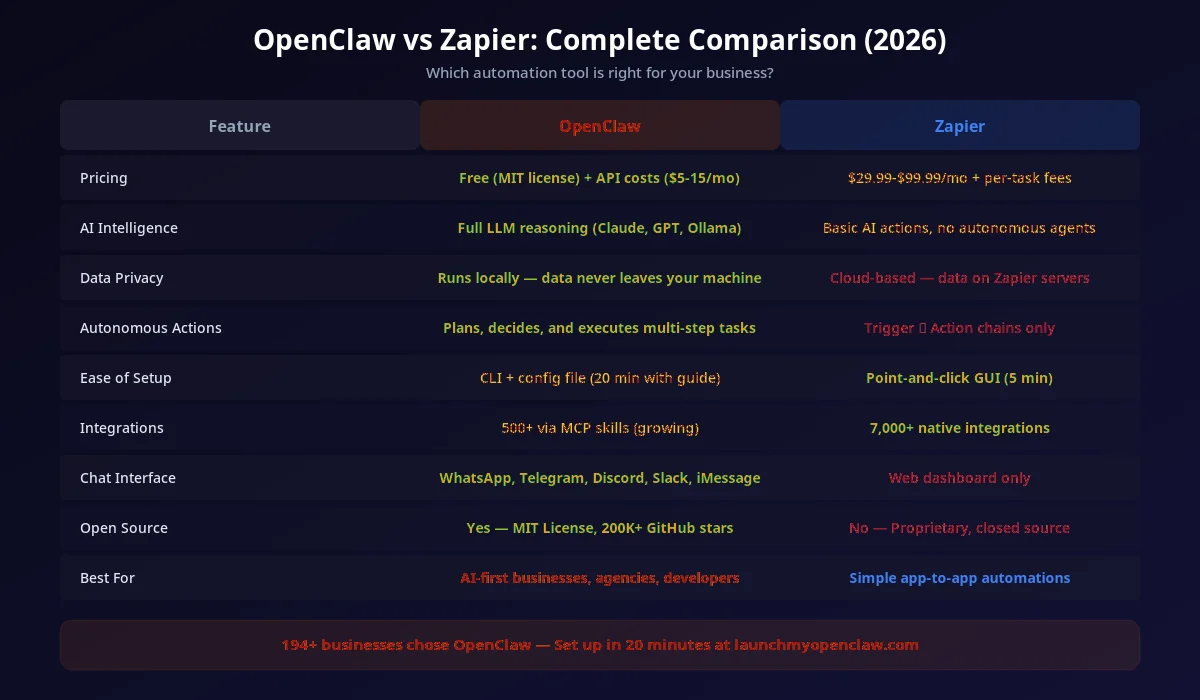
How Do OpenClaw and Zapier Compare Feature by Feature?
| Feature | OpenClaw | Zapier | Make |
|---|---|---|---|
| AI Intelligence | |||
| Runs Locally | |||
| Data Privacy | |||
| Natural Language Commands | |||
| Extensive Integrations | |||
| No-Code Setup | |||
| Per-Task Pricing | |||
| Works Offline | |||
| Context-Aware Decisions | |||
| Enterprise Cloud Option |
For a deeper dive into Make specifically, see our OpenClaw vs Make comparison.
How Much Does OpenClaw Cost vs Zapier?
Pricing is one of the biggest differentiators. OpenClaw is free and open-source — you only pay for the AI model API you choose. Zapier charges per task on a recurring monthly basis, and costs scale with usage.
| Plan | OpenClaw | Zapier | Make |
|---|---|---|---|
| Free Tier | Unlimited (MIT) | 100 tasks/mo | 1,000 ops/mo |
| Starter / Basic | $0 + ~$5/mo API | $29.99/mo (750 tasks) | $10.59/mo (10K ops) |
| Professional | $0 + ~$10/mo API | $73.50/mo (2K tasks) | $18.82/mo (10K ops) |
| Team / Business | $0 + ~$15/mo API | $103.50/mo (unlimited users) | $34.12/mo (10K ops) |
| High Volume (50K tasks/mo) | ~$15/mo API | $448.50/mo | $182/mo |
| Self-hosted Option | |||
| Per-task Billing | |||
| Hidden Fees | None | Premium apps extra | Operations overages |
5 Workflow Examples: OpenClaw vs Zapier Side by Side
The best way to understand the difference is to see the same task done in both platforms. Below are five common business workflows and how each tool handles them.
1. Lead Follow-Up After Form Submission
OpenClaw (natural language):
openclaw run "When a new lead comes in from the contact form,
read their message, determine if they're asking about pricing
or support, and send a personalized WhatsApp reply.
If it's a pricing question, also create a deal in the CRM."
OpenClaw reads the lead's message, understands intent, and takes different actions based on context — all from a single instruction.
Zapier (multi-step zap):
Requires 4–6 steps: Trigger (form submit) → Filter (check message content via keyword matching) → Path A (pricing reply + CRM) or Path B (support reply). Each path needs separate message templates and connector steps. No AI understanding — just keyword matching.
2. Email Triage and Prioritization
OpenClaw:
openclaw run "Monitor my inbox. For each new email:
- If it's from a client, mark as high priority and summarize in Slack #client-updates
- If it's a newsletter, archive it
- If it mentions an invoice, forward to accounting@company.com
- If it's spam, delete it"
The AI reads each email's full content and context, not just subject lines. It understands nuance — a client's informal "hey, about that invoice…" gets correctly routed to both #client-updates and accounting.
Zapier:
You'd need to create separate Zaps for each rule: one for client emails (using a filter on sender domain), one for newsletters (filter on subject keywords), one for invoices (keyword "invoice" in subject/body), and one for spam. Each Zap counts toward your task limit. Client emails that mention invoices would need a multi-path Zap.
3. Conversational Appointment Booking
OpenClaw:
openclaw run "When someone messages on WhatsApp asking to book,
check my Google Calendar for availability this week,
offer them 3 time slots, confirm their choice,
and create the calendar event with a Zoom link."
OpenClaw has a multi-turn conversation with the customer, handles rescheduling requests, and adapts if they ask "actually, do you have anything earlier?" — just like a human assistant would. Learn more in our WhatsApp automation guide.
Zapier:
Zapier can't hold conversations. You'd need to use a form (Calendly, Acuity) and then trigger a Zap on form completion. The "chat about available times" part isn't possible with Zapier alone — you'd need a separate chatbot tool.
4. Content Repurposing Pipeline
OpenClaw:
openclaw run "Take my latest blog post from WordPress,
create a Twitter thread (5 tweets), a LinkedIn post,
an Instagram caption, and an email newsletter draft.
Match the tone of my previous posts on each platform."
OpenClaw uses AI memory to match your writing style across platforms. It reads the full blog post, understands the key points, and adapts the tone for each channel. One command, four pieces of content.
Zapier:
You'd need 4 separate Zaps, each with a GPT integration step for rewriting. Each GPT call counts as an additional task. There's no shared context between Zaps, so each one reformats independently without awareness of your brand voice.
5. CRM Contact Enrichment
OpenClaw:
openclaw run "For each new contact in my CRM that's missing
a company name or job title, search the web for their
email domain, find their LinkedIn profile, and update
the CRM record with the information you find."
OpenClaw handles research, data extraction, and CRM updates in one workflow. It understands when data is ambiguous ("is this the right John Smith?") and can flag uncertain matches for review. For GoHighLevel users, OpenClaw integrates directly with the GHL API.
Zapier:
You'd need a dedicated enrichment tool (Clearbit, Hunter.io) plus multiple Zap steps. Each lookup is a task. Zapier can't do open-ended web research — it only works with structured API responses from integrated apps.
What Are the Key Differences Between OpenClaw and Zapier?
AI Intelligence vs Rules
OpenClaw:
OpenClaw uses AI to understand context, make decisions, and adapt to changing situations. It can handle complex multi-step workflows without explicit programming.
Zapier:
Zapier uses predefined rules: 'When X happens, do Y.' It's predictable but can't make intelligent decisions or handle ambiguous situations.
Local vs Cloud
OpenClaw:
OpenClaw runs on your computer. Your data stays local, and you maintain complete control over your automations and credentials.
Zapier:
Zapier runs in the cloud. Your data passes through their servers, and you depend on their uptime and security practices.
Pricing Model
OpenClaw:
OpenClaw is free and open-source (MIT license) with 200,000+ GitHub stars. You only pay for the LLM API you choose. LaunchMyOpenClaw.com provides a free setup guide.
Zapier:
Zapier charges per task. High-volume users can face bills of hundreds or thousands per month as usage scales. Zapier offers 8,000+ integrations but at a recurring cost.
Setup Complexity
OpenClaw:
OpenClaw requires initial setup (we offer a 20-minute workshop) but then uses natural language for new automations.
Zapier:
Zapier is easier to start but requires manual configuration for each workflow. Complex automations need technical expertise.
When Does Zapier Win? An Honest Assessment
We believe in being transparent. There are legitimate scenarios where Zapier is the better choice. Here's when you should stick with Zapier — or use both tools together.
Zapier Is Better When...
- You need simple app-to-app triggers
Connecting Stripe to Google Sheets takes 2 minutes in Zapier. No AI needed.
- Your team prefers a visual GUI
Non-technical team members can build and modify Zaps without writing or describing anything.
- You need a niche SaaS integration
Zapier's 8,000+ app catalog covers virtually every SaaS tool. OpenClaw covers 10,700+ skills on ClawHub but may lack some niche connectors.
- You want zero maintenance
Zapier is fully managed cloud. No server, no updates, no SSH tunnels to manage.
- Predictability matters more than intelligence
Zapier does exactly what you configure — nothing more, nothing less. For compliance-sensitive workflows, this determinism is valuable.
OpenClaw Is Better When...
- Workflows require understanding context
Email triage, lead qualification, content creation — anything that needs to 'read and think' before acting.
- You're automating conversations
WhatsApp, iMessage, SMS — OpenClaw handles multi-turn, intelligent conversations. Zapier can't.
- Data privacy is non-negotiable
OpenClaw runs on your machine. Your customer data, API keys, and messages never touch a third-party server.
- Cost matters at scale
At 5,000+ tasks/month, Zapier bills add up fast. OpenClaw stays at ~$10–15/mo in API costs.
- You want one tool for everything
OpenClaw combines automation + AI assistant + messaging + CRM updates in a single agent. No duct-taping 5 tools together.
When to Choose OpenClaw
- You want AI to make intelligent decisions in your workflows
- Data privacy and security are top priorities
- You're tired of paying per-task for high-volume automation
- You prefer natural language over visual workflow builders
- You want automations that can adapt to context
When to Choose Zapier
- You need simple 'if this, then that' automations
- Your team is already trained on Zapier's interface
- You prefer cloud-based tools you don't have to maintain
- You need specific integrations Zapier offers that OpenClaw doesn't
- Predictability is more important than intelligence
How to Migrate from Zapier to OpenClaw
Switching from Zapier to OpenClaw doesn't have to be all-or-nothing. Here's a step-by-step approach that minimizes risk and lets you validate each workflow before going fully over.
Audit Your Existing Zaps
List every active Zap. Categorize them: simple triggers (Stripe → Sheet), conditional logic (if/then), or AI-appropriate (understanding, deciding, generating). Start by migrating the AI-appropriate ones.
# Export your Zap list for review
# Go to zapier.com/app/zaps and note:
# - Zap name
# - Trigger app + action app
# - Monthly task count
# - Complexity (simple / conditional / AI-worthy)Install and Configure OpenClaw
Follow our complete setup guide to install OpenClaw. Takes about 15–20 minutes. Connect the same channels your Zapier zaps use — WhatsApp, iMessage, email, or GoHighLevel.
Run Both in Parallel
Keep your Zapier zaps running. Set up the equivalent OpenClaw workflows and run them side by side for 1–2 weeks. Compare outputs to make sure OpenClaw handles everything correctly.
Turn Off Zapier Zaps Gradually
Once you've validated each workflow, disable the Zapier version. Start with the high-volume zaps (biggest cost savings) and work toward the simpler ones. Keep Zapier active for any niche integrations where it still makes sense.
Downgrade or Cancel Zapier
Once your critical workflows are running on OpenClaw, downgrade Zapier to the free tier (100 tasks/month) for any remaining simple triggers, or cancel entirely. Most businesses find they can fully switch within 2–4 weeks.
What Are Common Questions About OpenClaw vs Zapier?
Your Competitors Are Already Automating. Are You?
Every week we send one automation that saves 10+ hours of manual work — the same playbooks our clients use to run their businesses on autopilot. Miss a week, miss the edge.
Get the Automation Playbook (Free)
One deploy-ready automation every week. Same strategies our clients pay thousands for. 400+ business owners already inside.
Need it done for you?
Book a Free Strategy Call See what we've built for real businesses →