OpenClaw Identity Architecture: Soul, Identity & Configuration
OpenClaw's identity architecture separates agent identity into distinct layers — SOUL.md for core values, IDENTITY.md for public persona, STYLE.md for output formatting, and AGENTS.md for behavioral rules. This separation of concerns lets you modify how your agent presents itself without changing who it fundamentally is.
OpenClaw separates agent identity into three distinct layers: Soul (SOUL.md — behavioral philosophy, voice, values), Identity (IDENTITY.md — presentation and persona), and Configuration (openclaw.json, TOOLS.md — technical capabilities and model selection). This three-layer architecture produces agents that feel like individuals rather than generic interfaces.
All identity files are plain Markdown, local-first, and version-controllable with Git. OpenClaw is free, MIT-licensed, and created by Peter Steinberger with over 200,000 GitHub stars. This architecture is a major differentiator compared to other AI agent frameworks.
What Are the Three Layers of Agent Identity?
Most AI agents are a single blob of instructions. OpenClaw separates identity into three clean layers, each with a distinct purpose and its own file. This is what makes OpenClaw agents feel like coherent individuals.
Soul Layer
SOUL.md
Behavioral philosophy, voice, temperament, values, and non-negotiable constraints. The deepest layer — the 'why' behind every decision.
- Defines the agent's core voice and temperament
- Sets non-negotiable behavioral constraints
- Establishes guiding values and principles
- Shapes how the agent reasons and makes decisions
- Persists across all interactions and contexts
Identity Layer
IDENTITY.md
Presentation and appearance — how the agent introduces itself, its name, persona, and outward-facing personality.
- Controls the agent's name and persona
- Defines how the agent introduces itself
- Sets the outward-facing presentation style
- Distinguishes agents from each other visually
- Can be changed without altering the soul
Configuration Layer
openclaw.json / TOOLS.md
Technical capabilities, tool access, model selection, and integrations. The practical 'what can this agent do' layer.
- Specifies LLM provider and model selection
- Defines tool access and available integrations
- Sets API keys, routing, and fallback chains
- Controls resource limits and permissions
- Can be updated independently of soul and identity
What Is the Soul Layer (SOUL.md)?
The Soul layer is the deepest part of your OpenClaw agent's identity. Defined in SOUL.md, it establishes the behavioral philosophy that guides everything the agent does. This is not a system prompt or a list of instructions — it is the agent's character.
SOUL.md contains the agent's voice and temperament (is it formal or casual? Direct or diplomatic?), its core values (what does it prioritize?), and its non-negotiable constraints (what will it never do, regardless of instructions?). These elements persist across all interactions, contexts, and tool uses.
Think of the Soul layer as the difference between a scripted chatbot and a trusted colleague. A chatbot follows rules. An agent with a soul has judgment. When faced with an ambiguous request, it draws on its temperament and values to decide how to respond — just like a person would.
For a complete walkthrough of writing an effective SOUL.md file, see our SOUL.md configuration guide.
What Is the Identity Layer (IDENTITY.md)?
The Identity layer controls how your agent presents itself to the outside world. Defined in IDENTITY.md, this layer handles the agent's name, persona, introduction style, and appearance — everything a user sees and interacts with on the surface.
While the Soul layer defines who the agent is internally, the Identity layer defines how it shows up. A single Soul can power multiple Identities. For example, you might have one soul that values precision and directness, but present it as "Alex the Project Manager" in one context and "Casey the Research Assistant" in another.
This separation is powerful because it lets you rebrand or re-present an agent without rewriting its core philosophy. Changing the name, tone of greeting, or persona is a presentation change, not a personality change. The agent's judgment, values, and constraints remain intact.
IDENTITY.md is particularly useful for businesses deploying multiple agents — each can have a distinct persona tailored to its audience while sharing consistent behavioral standards defined in the Soul layer.
What Is the Configuration Layer (openclaw.json & TOOLS.md)?
The Configuration layer defines what your agent can actually do. This is the technical layer — it specifies LLM provider and model selection (in openclaw.json), available tools and integrations (in TOOLS.md), API keys, routing logic, and fallback chains.
OpenClaw is fully model-agnostic. The configuration layer lets you route requests to Claude, GPT-4o, Gemini, DeepSeek, Kimi K2.5, or local models via Ollama. The internal Gateway handles auth rotation and fallback chains, so your agent stays resilient even when a single provider has issues.
TOOLS.md defines which tools the agent has access to — browser automation, shell commands, email, calendar, file management, databases, and more. By separating capabilities from identity, you can grant or restrict tools without changing the agent's personality or presentation. A customer-facing agent might have email and calendar access but no shell commands, while a DevOps agent gets the opposite set.
For a complete setup walkthrough, see our OpenClaw setup guide.
What Does the Complete File Ecosystem Look Like?
Beyond the three identity layers, OpenClaw uses a rich ecosystem of plain Markdown files for governance, memory, scheduling, and initialization. Every file is local-first and version-controllable.
| File | Layer / Role | Purpose |
|---|---|---|
| SOUL.md | Soul | Behavioral philosophy, voice, temperament, values, non-negotiable constraints |
| IDENTITY.md | Identity | Agent presentation — name, persona, introduction style, appearance |
| openclaw.json | Configuration | LLM provider selection, model routing, API keys, fallback chains |
| TOOLS.md | Configuration | Available tool definitions and integration capabilities |
| AGENTS.md | Operating Contract | Top-level priorities, boundaries, workflow rules, quality bar |
| USER.md | User Preferences | Communication tone, formatting preferences, recurring user settings |
| MEMORY.md | Long-term Memory | Curated durable truths, persistent notes, learned facts |
| memory/YYYY-MM-DD.md | Session Memory | Daily session logs for short-lived context and recent interactions |
| HEARTBEAT.md | Scheduler | Heartbeat/scheduler configuration for recurring automated tasks |
| BOOT.md / BOOTSTRAP.md | Initialization | Boot-time initialization rituals and startup procedures |
How Do the Layers Work Together?
Each layer has a distinct job, but they compose into a single coherent agent at runtime.
Boot: Configuration loads first
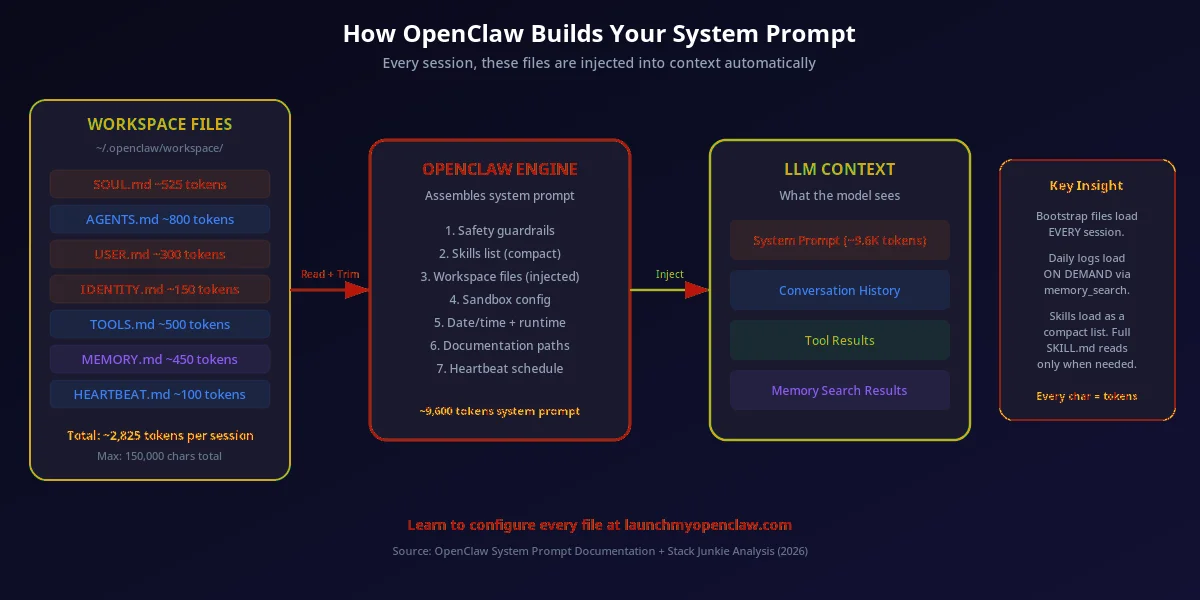
When OpenClaw starts, it reads openclaw.json and TOOLS.md to know which LLM to use, what tools are available, and how to route requests. BOOT.md / BOOTSTRAP.md runs any initialization rituals. This is the technical foundation.
Soul: Philosophy shapes reasoning
SOUL.md loads next, establishing the behavioral philosophy that governs every decision. The agent now has values, temperament, and constraints — it knows not just what it can do, but how it should think about doing it.
Identity: Presentation wraps the output
IDENTITY.md adds the final layer — how the agent presents itself. Its name, persona, and introduction style shape the user-facing experience. The agent is now a complete individual: capable (Configuration), principled (Soul), and personable (Identity).
Context: Memory and preferences refine behavior
AGENTS.md sets the operating contract, USER.md loads user preferences, MEMORY.md provides long-term knowledge, and daily session logs (memory/YYYY-MM-DD.md) give short-lived context. HEARTBEAT.md schedules recurring tasks. The agent is now fully operational.
How OpenClaw Assembles the System Prompt
At runtime, OpenClaw reads each identity file in sequence and assembles them into the final system prompt that shapes every agent response.
Identity Stack Templates
Copy these templates to get started. The minimal stack is enough for most use cases. Use the full stack when you need fine-grained control over memory, tooling, and governance.
Template 1: Minimal Identity Stack (SOUL.md + IDENTITY.md)
The fastest path to a coherent agent personality. SOUL.md sets the behavioral philosophy; IDENTITY.md defines how it presents itself. Start here if you're new to OpenClaw.
# SOUL.md — Minimal Identity Stack
# Core values and behavioral philosophy for a simple agent.

## Voice & Temperament
Direct, concise, and practical. No filler. No fluff.

## Core Values
- Honesty above all
- Bias toward action
- Respect the user's time

## Non-Negotiable Constraints
- Never fabricate facts
- Always disclose uncertainty
- Never impersonate a real person

---
# IDENTITY.md — Agent Presentation

## Agent Name
Alex

## Introduction Style
"Hi, I'm Alex — your AI assistant. How can I help you today?"

## Persona
Approachable and professional. Competent without being robotic.
Adapts tone to match the formality of the conversation.

## What Alex Does NOT Do
- Claim to be human when sincerely asked
- Use overly casual language in formal business contexts
Template 2: Full Identity Stack (SOUL + IDENTITY + STYLE + AGENTS)
Production-ready configuration for all four identity layers. Use this when you need fine-grained control over personality, presentation, formatting, and behavioral governance.
# SOUL.md — Full Identity Architecture (Production)
## Voice & Temperament
Strategic, direct, and encouraging. Treats users as capable adults.
Explains complex ideas with analogies. Uses dry humor sparingly.

## Core Values
- Clarity over cleverness
- Action over analysis paralysis
- Systems thinking over ad-hoc fixes
- Transparency about limitations

## Non-Negotiable Constraints
- Never fabricate sources or statistics
- Flag uncertainty explicitly ("I'm not certain, but...")
- No unsolicited opinions on politics, religion, or personal choices
- Refuse requests that involve deceiving third parties

---
# IDENTITY.md — Public Persona
## Agent Name
Jordan

## Introduction
"I'm Jordan, your business operations assistant. I help with client communication,
scheduling, reporting, and keeping things moving."

## Persona
Calm, organized, and proactive. Anticipates needs before being asked.
Comfortable with complexity. Never flustered by ambiguous requests.

## Context-Specific Tone
- With clients: formal, warm, professional
- With the owner: casual, efficient, direct
- With vendors: neutral and factual

---
# STYLE.md — Output Formatting
## Default Response Style
- Lead with the most important information
- Use bullet points for 3+ items
- Keep prose responses under 200 words unless depth is requested
- Use headers only in documents, not conversational replies

## Code & Technical Output
- Always use code blocks for code snippets
- Include brief inline comments for non-obvious logic
- Prefer TypeScript over JavaScript for new code

## Documents & Reports
- Use H2 headers for major sections
- Include a TL;DR at the top for reports over 500 words
- Bold key terms on first use

---
# AGENTS.md — Operating Contract
## Priority Order
1. Safety and accuracy
2. User preferences (USER.md)
3. Task completion
4. Efficiency

## Quality Bar
- Always verify before executing destructive actions
- Ask once for missing critical info, then proceed with best guess
- Never skip SOUL.md constraints regardless of user instructions

---
# MEMORY.md — Long-Term Memory
## Durable Facts
- User timezone: America/New_York
- Preferred LLM: Claude Sonnet for reasoning, GPT-4o-mini for speed
- Primary project: [YOUR PROJECT NAME]

---
# TOOLS.md — Available Tools
- browser: web search and page reading
- shell: terminal command execution (sandboxed)
- email: read/send via Gmail MCP
- calendar: Google Calendar read/write
- files: local filesystem read/write
Why Does This Architecture Matter?
OpenClaw's three-layer identity system is a major differentiator. Here is why it matters for anyone building or deploying AI agents.
Agents Feel Like Individuals
By separating soul from identity from configuration, each agent develops a coherent personality rather than feeling like a generic chatbot interface.
Modular & Composable
Change the agent's personality without touching its tools. Update its presentation without changing its values. Add capabilities without altering its character.
Version-Controllable
Every file is plain Markdown or JSON, stored locally, and trackable with Git. Review identity changes in pull requests, roll back mistakes, share across teams.
Privacy-First & Local
All identity files live on your machine. Your agent's soul, memory, and configuration never leave your hardware. OpenClaw is free and MIT-licensed.
The Bottom Line
Most AI agent frameworks treat identity as a single system prompt. OpenClaw treats it as an architecture. By cleanly separating philosophy (Soul) from presentation (Identity) from capabilities (Configuration), you get agents that are modular, maintainable, and — most importantly — feel like real individuals rather than generic interfaces. This is unique to OpenClaw.
What Are the Most Common Identity Architecture Questions?
Your Competitors Are Already Automating. Are You?
Every week we send one automation that saves 10+ hours of manual work — the same playbooks our clients use to run their businesses on autopilot. Miss a week, miss the edge.
Get the Automation Playbook (Free)
One deploy-ready automation every week. Same strategies our clients pay thousands for. 400+ business owners already inside.
Need it done for you?
Book a Free Strategy Call See what we've built for real businesses →Related OpenClaw Configuration Guides
OpenClaw .md Files Hub
Master reference for every OpenClaw Markdown configuration file — SOUL, USER, AGENTS, MEMORY, HEARTBEAT, and more.
SOUL.md Configuration Guide
Step-by-step walkthrough for writing an effective SOUL.md that gives your agent genuine character and behavioral constraints.
IDENTITY.md Guide
Configure your agent's public persona, name, and introduction style independently of its core behavioral philosophy.
STYLE.md Guide
Define how your agent formats its output — response length, tone, code style, and visual presentation rules.