OpenClaw BOOT.md & Bootstrap Guide
BOOTSTRAP.md defines one-time setup tasks that run when your OpenClaw agent initializes for the first time or after a reset. It handles environment verification, tool configuration, file creation, and initial data loading. Once bootstrap completes, these tasks don't run again — they're your agent's "first boot" sequence.
Quick Answer: BOOT.md is a plain markdown file in OpenClaw that defines boot-time initialization rituals. When your agent starts, it reads BOOT.md to load context, check prerequisites, initialize connections, and establish its operational state. BOOTSTRAP.md is its companion for one-time first-run setup. Both are part of OpenClaw's full configuration ecosystem alongside SOUL.md, USER.md, TOOLS.md, and openclaw.json.
This guide covers what goes in BOOT.md, the difference from BOOTSTRAP.md, real configuration examples, and best practices for reliable agent initialization.
What is BOOT.md?
Startup Initialization
Defines the sequence of actions an agent performs every time it starts up. Load context, check dependencies, initialize connections, and prepare for task execution.
Context Loading
Instructs the agent to read specific files, databases, or data sources at boot time. Ensures the agent has the necessary context before processing any user requests.
Prerequisite Validation
Specifies checks the agent should perform at startup — verifying API keys are valid, required services are running, and dependencies are available before accepting tasks.
Operational Rules
Establishes critical rules and constraints that the agent should always follow. These are loaded at boot time so they are always in the agent's active context.
How Does Boot-Time Initialization Work?
Understanding the agent startup sequence helps you write effective BOOT.md files. Here is what happens when OpenClaw launches.
Step 1: Configuration Loading
~100msOpenClaw reads openclaw.json for technical settings — model provider, API keys, Gateway configuration, and plugin settings. This is the foundational layer.
Step 2: Identity Files
~50msSOUL.md (agent philosophy), USER.md (user preferences), and TOOLS.md (capabilities) are loaded into the agent's context. These define who the agent is and what it can do.
Step 3: BOOT.md Execution
VariableThe agent reads BOOT.md and follows the initialization ritual. This is where your custom startup logic runs — loading data, checking connections, preparing state.
Step 4: Ready State
~10msAfter all boot steps complete, the agent enters its ready state and begins accepting and processing tasks. Failed boot checks may trigger alerts or degraded mode.
What Is the Difference Between BOOTSTRAP.md and BOOT.md?
These two files serve different purposes. Understanding when to use each is critical for clean agent configuration.
| Feature | BOOT.md | BOOTSTRAP.md |
|---|---|---|
| When it runs | Every time the agent starts | Only on first launch or explicit trigger |
| Purpose | Ongoing initialization ritual | One-time setup tasks |
| Typical contents | Load context, check connections, set state | Create directories, init databases, download resources |
| Idempotent | Yes — safe to run repeatedly | Should be — but designed for single execution |
| File location | Project root: ./BOOT.md | Project root: ./BOOTSTRAP.md |
| Required | No — but strongly recommended | No — only for complex first-run setups |
What Are Some Configuration Examples?
Real-world BOOT.md and BOOTSTRAP.md templates for common agent types. Each is ready to customize for your specific use case.
General-Purpose Agent Boot
A well-rounded BOOT.md for agents handling diverse automation tasks.
- Read the project README.md for context on what this agent automates
- Verify all API keys in .env are present and non-empty
- Check that the Ollama server is reachable (if using local models)
- Load the task queue from ./data/pending-tasks.json
- Review SOUL.md to refresh personality and communication guidelines
- Confirm TOOLS.md permissions match the current deployment environment
Developer Agent Boot
BOOT.md for a coding-focused agent that works on a codebase.
- Run 'git status' to understand the current state of the repository
- Read CHANGELOG.md for recent changes and current version
- Check that all test suites pass before accepting new coding tasks
- Load the project's coding style guide from ./docs/STYLE.md
- Verify the development environment has required dependencies installed
- Review open issues and pull requests for context on current priorities
Business Automation Agent Boot
BOOT.md for an agent managing CRM, email, and scheduling workflows.
- Verify CRM API connection (HubSpot/GoHighLevel) is authenticated
- Check email service credentials and send a test ping
- Load today's calendar from Google Calendar API
- Read ./data/active-campaigns.json for current marketing campaigns
- Verify Stripe webhook endpoint is responsive
- Load customer segment definitions from ./config/segments.json
First-Run BOOTSTRAP.md
BOOTSTRAP.md for one-time setup tasks that only run on initial deployment.
- Create required directories: ./data, ./logs, ./cache, ./backups
- Initialize the SQLite database at ./data/agent.db with schema
- Download and cache required NLP models for text processing
- Generate unique agent instance ID and store in ./config/instance.json
- Set up log rotation configuration for ./logs directory
- Create initial backup of all configuration files
Copy-Ready BOOT.md Templates
Production-ready BOOT.md templates you can copy and customize for your specific agent type. Each template is fully annotated.
# BOOT.md — Basic Bootstrap Configuration
# Runs every time OpenClaw starts

## Context Loading
- Read README.md for project overview and current objectives
- Load USER.md to refresh communication preferences
- Review SOUL.md to re-anchor personality and tone guidelines

## Prerequisite Checks
- Verify all required API keys in .env are present and non-empty
- Confirm the primary model endpoint is reachable
- Check that ./data/ directory exists and is writable

## Initialization Steps
- Load task queue from ./data/pending-tasks.json (create empty array if missing)
- Set operational mode to: standard
- Log boot timestamp to ./logs/boot.log

## Operational Reminders
- Always confirm destructive actions before executing
- Keep responses concise unless the user requests detail
- Flag any missing prerequisites before attempting tasks# BOOT.md — Multi-Agent Bootstrap Setup
# Orchestrator agent initialization — runs every startup
## Identify Agent Role
- This agent is the ORCHESTRATOR in a multi-agent pipeline
- Sub-agents: researcher, writer, reviewer (see ./config/agents.json)
- Communication protocol: JSON message passing via ./data/agent-queue/
## Orchestrator Initialization
- Load active workflow definitions from ./workflows/
- Check sub-agent availability by pinging each agent's health endpoint
- Read ./data/shared-memory.json for cross-agent context
- Verify no orphaned tasks exist in ./data/agent-queue/in-progress/
## Coordination Rules
- Do not assign tasks to sub-agents that are already processing
- Log all inter-agent communications to ./logs/orchestrator.log
- If a sub-agent fails, retry once then escalate to human review
- Maximum concurrent sub-agent tasks: 3
## Handoff Protocol
- Completed tasks from sub-agents land in ./data/agent-queue/completed/
- Review and validate all sub-agent outputs before delivering to user
- Archive completed workflows to ./data/archive/ after 7 days# BOOT.md — Bootstrap with Custom Tool Initialization
# For agents with specialized tools requiring setup at boot time
## Tool Registry Check
- Read TOOLS.md to confirm currently enabled tools and permission levels
- Verify tool version compatibility with current OpenClaw runtime
## Database Tools
- Initialize SQLite connection to ./data/agent.db
- Run pending schema migrations if ./migrations/ contains new files
- Verify read/write permissions on all database tables
- Cache frequently-accessed lookup tables in memory
## External API Tools
- Test HubSpot CRM connection: GET /contacts (expect 200, log latency)
- Test email service: validate SMTP credentials without sending
- Verify Stripe webhook endpoint is registered and responsive
- Check Google Calendar API token expiry — refresh if < 24h remaining
## File System Tools
- Confirm access to all configured watched directories
- Scan ./data/uploads/ for any unprocessed files from previous session
- Clean temp files older than 48h from ./tmp/
## Ready State
- All tools initialized: log "BOOT COMPLETE" with tool inventory summary
- If any tool fails: log warning, set degraded mode flag, notify user on first interactionCopy-Paste BOOTSTRAP.md Templates
Three ready-to-use BOOTSTRAP.md templates for the most common first-run scenarios. Copy, customize the placeholders, and drop into your workspace.
Template 1: New Hire Onboarding
Set up tools, import contacts, configure permissions, and create a workspace on first boot.
# BOOTSTRAP.md — New Hire Onboarding Agent

## Run Condition
- Run ONLY on first initialization or when explicitly instructed to re-bootstrap
- Check for ./config/.bootstrapped flag — if present, skip all tasks below

## Step 1: Set Up Tools & Environment
- Verify required tools are installed (Node.js, git, curl)
- Authenticate with company SSO provider
- Set up MFA for all service accounts
- Configure timezone and locale settings

## Step 2: Import Contacts
- Import employee directory from HR system CSV at ./imports/employees.csv
- Load client contact list from CRM export
- Create contact groups: Internal, Clients, Vendors
- Validate all phone numbers and email addresses

## Step 3: Configure Permissions
- Request read access to project management workspace
- Configure email delegation settings
- Set up calendar sharing with manager
- Enable Slack workspace access

## Step 4: Create Workspace
- Create folder structure: ./projects, ./clients, ./resources, ./archive
- Import company brand assets to ./resources/brand
- Set up shared document templates in ./resources/templates
- Initialize task tracker at ./data/tasks.json

## Completion
- Write timestamp to ./config/.bootstrapped
- Send welcome message to manager confirming setup complete
- Log all completed steps to ./logs/bootstrap.log
Template 2: Project Kickoff
Create directories, import docs, set up git repos, and initialize databases for a new project.
# BOOTSTRAP.md — Project Kickoff Agent

## Run Condition
- Run once per new project initialization
- Flag file: ./config/.project-bootstrapped

## Step 1: Create Directory Structure
- Create project root: ./projects/{project-name}/
- Create subdirectories: src/, docs/, tests/, assets/, config/
- Create README.md with project name and description
- Create CHANGELOG.md with initial version entry

## Step 2: Import Documents
- Import project brief from ./imports/brief.pdf
- Import client requirements doc from ./imports/requirements.docx
- Convert and save as Markdown to ./docs/
- Create docs index at ./docs/README.md

## Step 3: Set Up Git Repository
- Initialize git repo with 'git init'
- Create .gitignore from template
- Add all initial files with 'git add .'
- Create initial commit: "chore: project initialization"
- Push to remote repository (if remote URL configured)

## Step 4: Initialize Databases & Config
- Create project config at ./config/project.json
- Initialize SQLite database at ./data/project.db
- Seed database with initial schema from ./config/schema.sql
- Create .env.example from template

## Completion
- Write timestamp to ./config/.project-bootstrapped
- Send project kickoff summary to team Slack channel
- Log all steps to ./logs/project-bootstrap.log
Template 3: Personal Setup
Import preferences, set up integrations, and configure notifications for a personal agent.
# BOOTSTRAP.md — Personal Agent Setup

## Run Condition
- Run once on initial personal agent deployment
- Flag file: ~/.openclaw/.personal-bootstrapped

## Step 1: Import Preferences
- Load preferred communication style from ./imports/preferences.json
- Set preferred response length (default: concise)
- Configure preferred date/time formats
- Set language and regional preferences
- Import custom vocabulary and terminology list

## Step 2: Set Up Integrations
- Authenticate with Google account (Gmail + Calendar)
- Connect to preferred messaging app (WhatsApp / Telegram)
- Link note-taking app (Notion / Obsidian)
- Set up read-it-later service integration
- Connect to password manager for secure credential access

## Step 3: Configure Notifications
- Set up morning briefing delivery (default: 7:50 AM)
- Configure urgent message alert threshold
- Set do-not-disturb schedule: 11 PM - 7 AM
- Enable weekly summary report (default: Sunday 7 PM)
- Configure which events trigger immediate alerts

## Step 4: Personalize Memory
- Create ./MEMORY.md with user background context
- Add key contacts, relationships, and context
- Document recurring preferences and shortcuts
- Set up personalized greeting and sign-off style

## Completion
- Write timestamp to ~/.openclaw/.personal-bootstrapped
- Send confirmation message to user's primary device
- Log all steps to ./logs/personal-bootstrap.log
What Are the BOOT.md Best Practices?
Follow these guidelines to write BOOT.md files that are reliable, maintainable, and efficient.
Keep It Concise
BOOT.md runs on every startup. Long boot files slow down agent initialization. Focus on essential checks and context loading — anything that is not needed at boot time belongs elsewhere.
Make It Idempotent
Boot rituals should be safe to run repeatedly. Do not include actions that create duplicate data, send duplicate notifications, or fail on second execution. Check-then-act, not just act.
Order Matters
List initialization steps in dependency order. Load configuration before checking API connections. Verify prerequisites before loading task queues. The agent follows the order you specify.
Define Failure Behavior
Specify what the agent should do when a boot check fails. Should it retry? Fall back to a degraded mode? Alert the user and halt? Explicit failure handling prevents silent breakdowns.
Environment-Aware
Include instructions for the agent to detect its environment (development, staging, production) and adjust boot behavior accordingly. Development may skip certain security checks; production should not.
Document Everything
Use markdown headers and clear language. Other developers (and the agent itself) will read this file. Explain why each boot step exists, not just what it does.
The Full OpenClaw Configuration Ecosystem
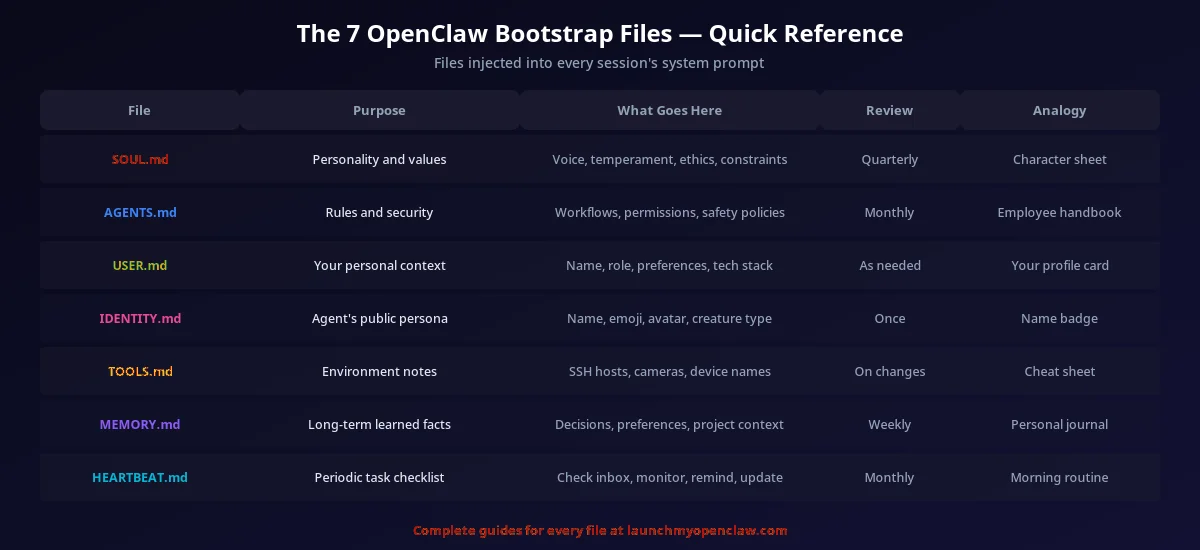
BOOT.md is one piece of OpenClaw's modular configuration system. Here is how all the configuration files work together to define a complete agent.
- openclaw.json — Technical settings: model provider, API keys, Gateway config, plugins
- SOUL.md — Agent philosophy and personality: tone, values, decision-making principles
- USER.md — User preferences: communication style, formatting, recurring preferences
- TOOLS.md — Capabilities and permissions: what tools the agent can access and use
- BOOT.md — Startup ritual: initialization steps that run every time the agent launches
- BOOTSTRAP.md — First-run setup: one-time initialization tasks for new deployments
- SKILL.md — Skill definitions: packages from ClawHub that extend agent capabilities
- All files are plain markdown (except openclaw.json) — human-readable and version-controllable
Trusted by 194+ business owners who configured OpenClaw in our live workshop — endorsed by Josh Nelson's 7 Figure Agency community (20,000+ agency owners)
Frequently Asked Questions
Your Competitors Are Already Automating. Are You?
Every week we send one automation that saves 10+ hours of manual work — the same playbooks our clients use to run their businesses on autopilot. Miss a week, miss the edge.
Get the Automation Playbook (Free)
One deploy-ready automation every week. Same strategies our clients pay thousands for. 400+ business owners already inside.
Need it done for you?
Book a Free Strategy Call See what we've built for real businesses →Related OpenClaw Configuration Guides
.md Files Hub
The complete reference for every markdown configuration file in the OpenClaw ecosystem.
HEARTBEAT.md Guide
Configure recurring scheduled tasks that run after your agent's bootstrap is complete.
Skills & Plugins Guide
Add capabilities to your agent after bootstrap — extend what it can do.
TOOLS.md Guide
Configure which tools your agent has access to during and after bootstrap.